The name combines Typst, the typesetting system at the center of the project, with sastra—a word associated with writing, literature, and knowledge. It reflects the idea that a document editor should support not only typesetting, but also the languages, scripts, and long-form work that give writing its meaning.
Most code editors are designed around programming. They default to monospace fonts, assume relatively simple text boundaries, and optimize editing behavior for source code written primarily in Latin scripts. Those defaults are reasonable for code, but they do not always work well for human-language documents—especially documents written in Khmer, Lao, Arabic, and other complex scripts.
A monospace font may technically contain the necessary characters, but that does not mean the text will look good or remain comfortable to read for hours. Complex-script typography depends on shaping, mark placement, appropriate spacing, and fonts designed specifically for the writing system.
The problem goes deeper than appearance.
Cursor movement, text selection, and deletion must respect grapheme clusters—the sequences of Unicode code points that users perceive as a single written unit. A visible character may contain a base consonant, combining marks, dependent vowels, or script-specific joining sequences.
If an editor moves or deletes through those sequences incorrectly, it may place the cursor inside a cluster or remove only part of a visible character. The text can become malformed even though the editor appears to be working normally.
That was the original reason I started building Typsastra.
Rendering was supposed to be the easy part
At first, I was not particularly concerned about document rendering.
Tinymist already provided the important Typst tooling:
- Language Server Protocol support
- Diagnostics and completion
- Live preview
- Forward synchronization
- Inverse synchronization
- PDF export
My assumption was simple: integrate Tinymist, use its preview, and call it a day.
For small documents, this worked well. Compilation was fast, the preview was responsive, and the development effort could remain focused on the editor itself—where complex-script navigation, deletion, spellchecking, completion, and font behavior needed the most attention.
Then I started testing larger documents.
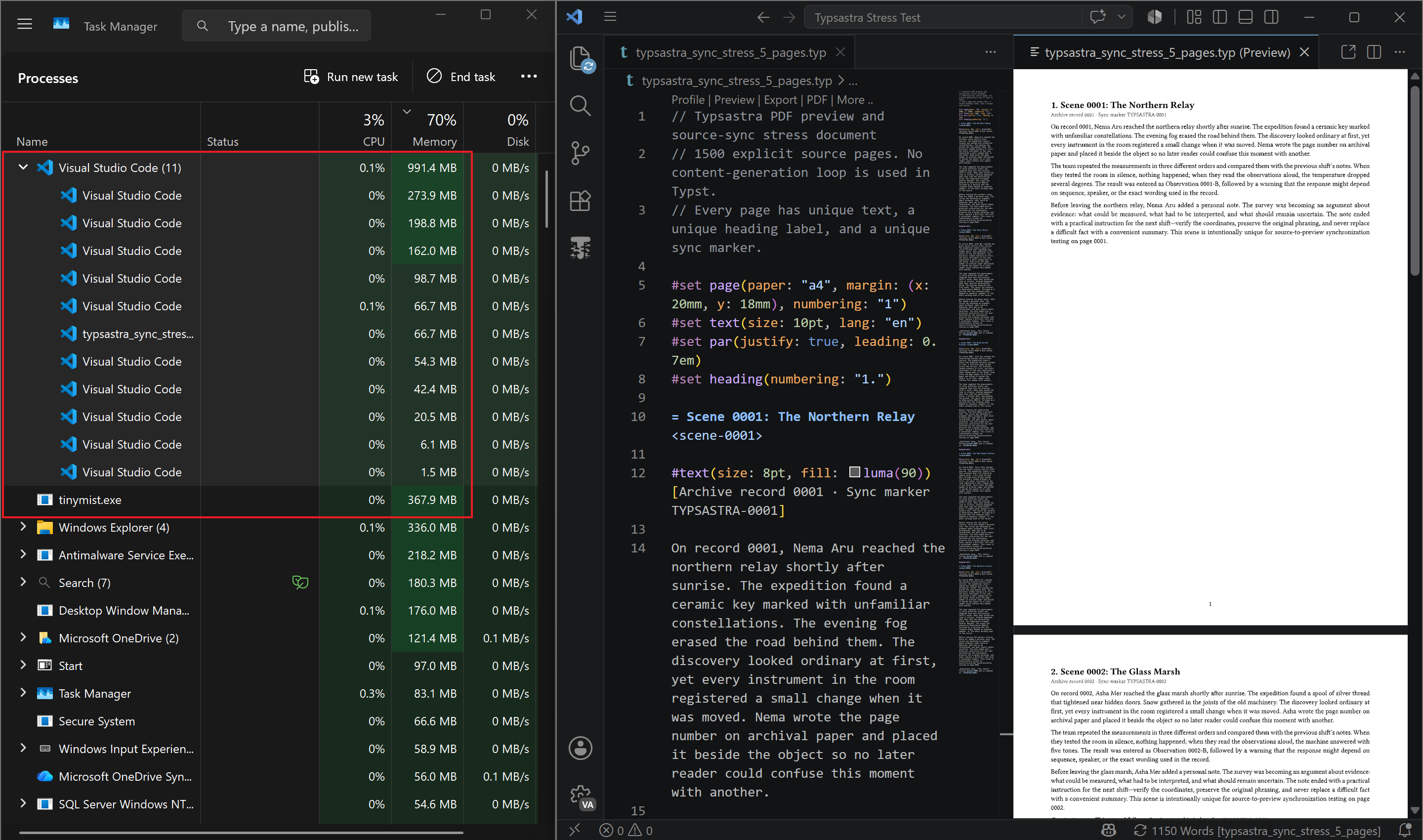
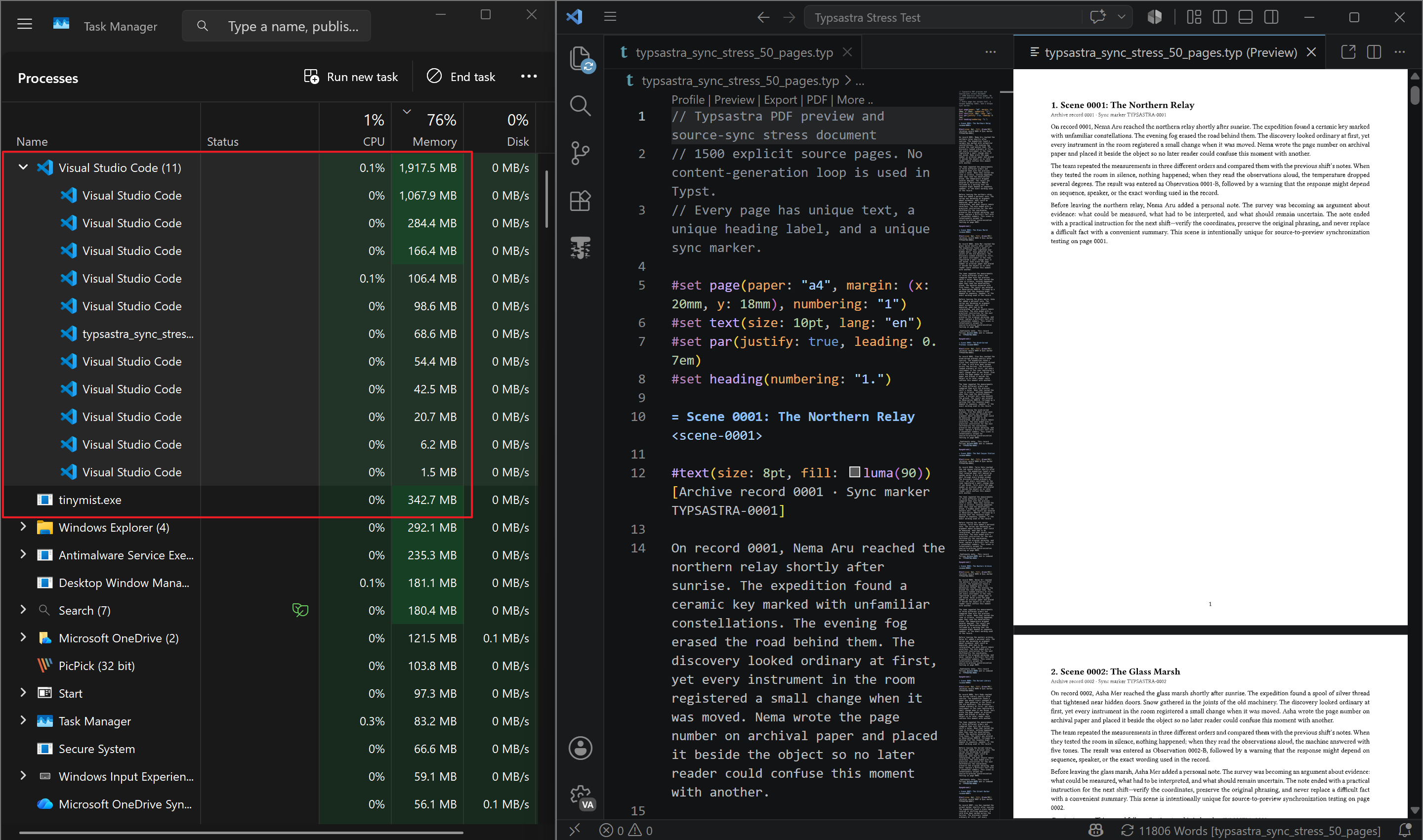
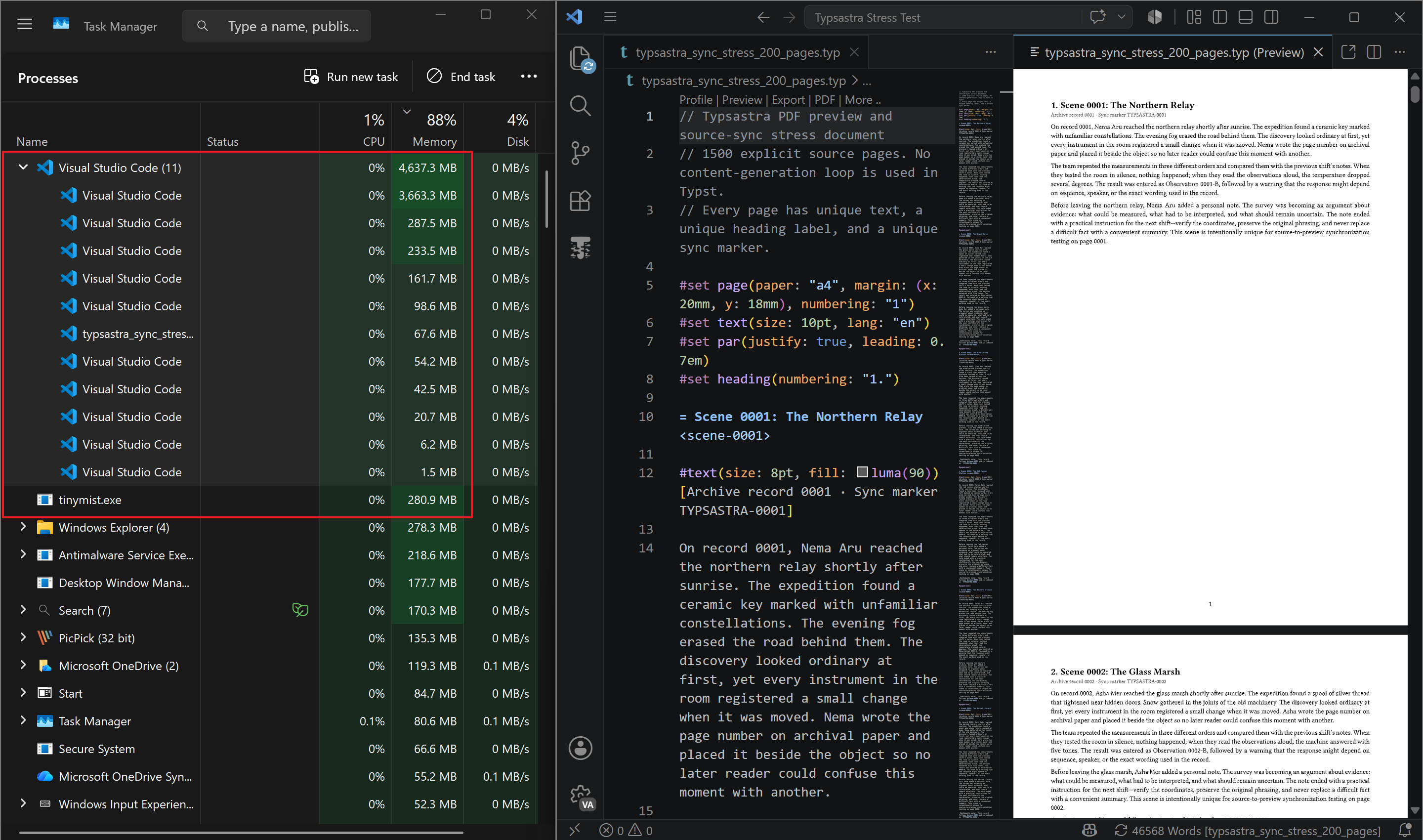
A document grew from a few pages to tens of pages, and then to hundreds of pages. As it grew, memory consumption became increasingly difficult to ignore.
The preview was fast, but it was not cheap.
The hidden cost of SVG preview
Tinymist’s SVG preview is designed for responsiveness. It can partially update the document rather than forcing the entire preview to be replaced after every edit. This makes the connection between typing and visual output feel immediate.
That is a significant advantage. When a user changes a sentence, they do not want to wait several seconds just to see the result.
However, responsiveness is not the only measure of a good preview system.
A preview also needs to remain stable over time and behave predictably as the document grows. It should not require several gigabytes of memory simply because the author is working on a long book, thesis, technical report, or multilingual publication.
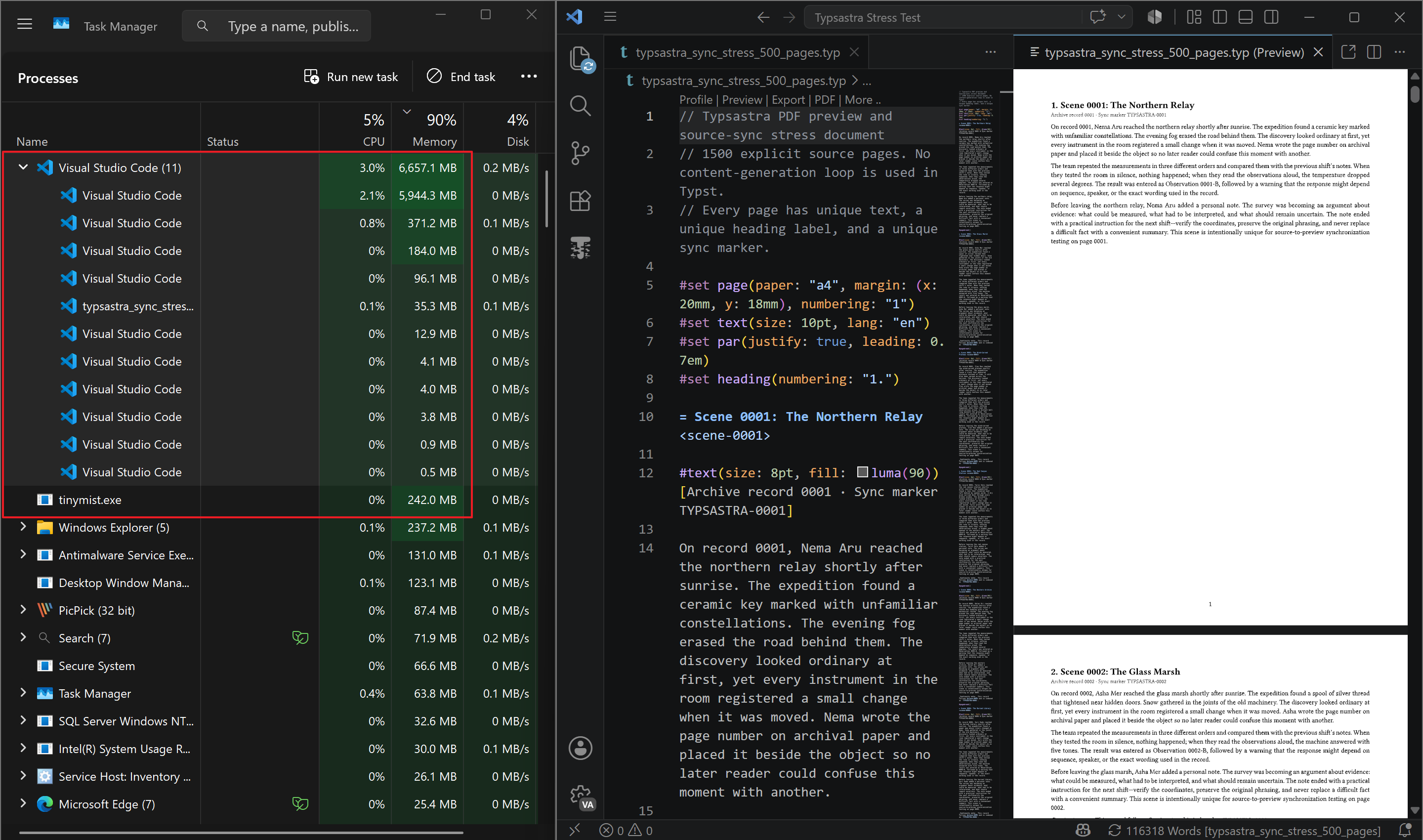
During one of my tests, previewing a document of approximately 500 pages in my local VS Code and Tinymist environment caused memory usage to continue climbing. It eventually approached 7 GB before the application crashed.
That result changed the direction of Typsastra.
The problem was no longer just:
How can I make complex-script editing work correctly?
It became:
How can I build an environment where people can reliably author genuinely long documents?
If Typsastra was going to support books, theses, research documents, and multilingual publications, this level of memory consumption was unacceptable—especially for users working on low-end computers.
That question sent me down a much deeper rabbit hole.
A preview is part of the document architecture
It would have been easy to treat the preview as a separate PDF viewer attached to the editor. But Typsastra is not intended to be only a text editor with a PDF window beside it.
The editor and preview represent the same document.
That relationship must remain intact across:
- Multi-file projects
- Included chapters
- Large source files
- Long generated PDFs
- Forward synchronization
- Inverse synchronization
- Zooming and scrolling
- Compilation failures
- Main-document changes
- Preview replacement after recompilation
Forward synchronization should take the source cursor directly to the corresponding PDF page. Inverse synchronization should let the user interact with the preview and return to the correct source file and location.
Those features become much harder when a project contains many source files and produces more than a thousand pages.
The challenge was not merely to display a PDF efficiently. It was to preserve the identity of the document across editing, compilation, source mapping, and preview replacement.
This led me to reconsider how a Typst document should be previewed inside Typsastra.
Choosing bounded memory over maximum immediacy
Typsastra moved toward a virtualized PDF preview.
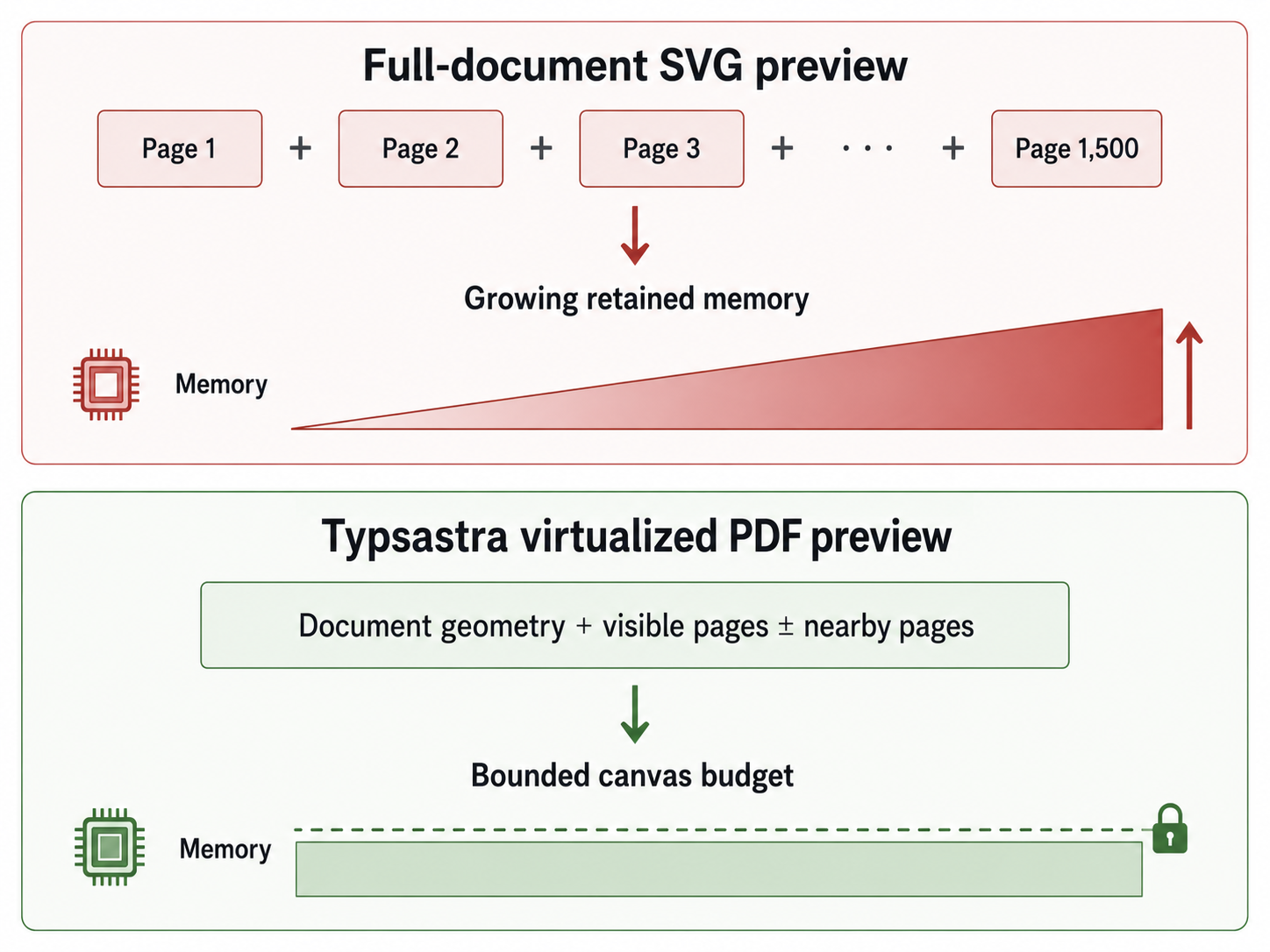
Instead of retaining a rendered representation of the entire document, the viewer prioritizes the pages currently visible to the user and a small number of nearby pages. Pages outside that active window do not need to keep expensive rendered canvases resident in memory.
The preview maintains document geometry so that the scrollbar can still represent the full document, but the number of fully rendered pages remains bounded.
This changes the scaling behavior.
A 1,500-page document still has 1,500 logical pages, but Typsastra does not need to keep 1,500 rendered pages alive simultaneously. The cost of the preview is driven more by the visible page window than by the total length of the document.
Building this required more than simply adding lazy loading. The viewer needed to understand user interaction:
- Which pages are currently visible?
- Which direction is the user scrolling?
- Is the gesture accelerating or decelerating?
- Has the user released the scrollbar?
- Which pages should render first when the viewport contains parts of two pages?
- Which previous canvases can be retained?
- Which obsolete render tasks should be cancelled?
- How can the preview be replaced without briefly showing an empty frame?
Gesture scrolling and scrollbar dragging also behave differently.
During gesture scrolling, movement gradually accelerates and decelerates. Rendering only after the motion completely stops makes the viewer feel unresponsive. Rendering every intermediate page wastes work and can delay the page the user ultimately wants.
Scrollbar dragging creates another challenge. The user can jump hundreds of pages in a fraction of a second. When the pointer is released, every visible destination page must be promoted immediately. Rendering only one page can leave half the viewport blank.
The final design uses motion-aware scheduling, destination prediction, bounded canvas ownership, and hardware-accelerated PDF rendering. It prioritizes the pages that matter now without allowing abandoned work to consume the rendering queue.
The compromise
There is an unavoidable compromise.
A PDF-based preview cannot always feel as immediate as a partial SVG preview. After an edit, Typst must produce updated PDF output, and the viewer must load the new document generation and render the relevant pages.
Trying to hide that reality completely would introduce more complexity, memory pressure, and fragile behavior.
I decided that Typsastra did not need to chase perfection.
A tiny delay after editing can be acceptable. Crashing because the document has grown too large is not.
Typsastra also supports different preview refresh policies. Authors who prioritize stability while working on very large documents can render on save rather than recompiling after every keystroke. The editor should remain responsive even when the document itself is expensive to compile.
This is a deliberate product decision: predictable resource use is more valuable than winning every latency comparison.
What the results mean
In one manual 200-page test on my Windows development machine, Typsastra’s later production-equivalent memory observation was approximately 743 MiB, including the application, WebView, and Tinymist. The comparison VS Code and Tinymist environment continued growing and reached approximately 4.8 GB in the final capture.
That is roughly 6.5 times the observed memory use.
This was not a controlled universal benchmark. The VS Code process group included its extension environment, and Windows Task Manager reports working-set values rather than a complete laboratory-grade memory trace. Different documents, platforms, extensions, and preview configurations will produce different results.
Nevertheless, the behavior demonstrates the architectural difference.
Typsastra’s preview is designed around a bounded number of resident page canvases. Its memory use should not grow simply because every page in a long document exists.
More importantly, Typsastra can work with source files containing around 20,000 lines and generated documents reaching approximately 1,500 pages while retaining document synchronization and a usable preview.
That matters more to me than making every keystroke appear instant.
Manual 200-page memory observation
One Windows development machine; working-set values, not a controlled universal benchmark.Optimization is also an accessibility feature
Performance discussions often focus on benchmark scores, rendering speed, or technical elegance. But resource efficiency has a direct effect on who can use an application.
Not everyone owns a recent workstation with large amounts of RAM. Students, researchers, independent writers, and language communities may be working with older laptops or entry-level hardware.
If an editor requires several gigabytes of memory to open a long document, that is not merely a performance issue. It becomes an accessibility barrier.
The same principle that motivates Typsastra’s complex-script support also motivates its performance architecture.
Supporting a language should mean more than rendering its characters. It should include correct editing behavior, appropriate fonts, reliable language tools, and the ability to work on affordable hardware.
What I want Typsastra to become
Typsastra began as a solution to a complex-script editing problem. That problem led to Unicode-aware navigation and deletion, language-specific segmentation, spellchecking, completion, and better font handling.
Long-document testing then revealed another kind of exclusion: software that works beautifully for small examples but becomes inaccessible when the document or project grows.
Solving that problem required rebuilding a part of the application that I originally expected to delegate entirely to existing tooling.
The result is not perfect, and it does not need to be.
Typsastra may not always match the immediacy of a partial SVG preview. But it can provide a responsive editor, bounded PDF rendering, and reliable source synchronization for documents far larger than the examples most editors are tested against.
That is the direction I want Typsastra to continue following:
An authoring environment built for real documents, complex writing systems, long-form work, and the computers people actually own.
Inclusivity is not only about which languages an application can display.
It is also about whether people can afford the hardware required to use it.
Explore Typsastra
Typsastra is an open-source, complex-script-first Typst environment for research and long-form multilingual writing. It is currently beta software and is being developed in public under the MIT License.
- Typsastra on GitHub
- Download the latest release
- Read the project roadmap
- Review the published benchmark notes
If you work with Typst, complex scripts, multilingual documents, or unusually long publications, feedback and reproducible test cases are welcome. They help shape Typsastra around the documents and hardware people use in practice.
Follow the work
Typsastra is open source. Explore the code, try the beta, or share a document that pushes the preview in an interesting way.
Visit Typsastra on GitHub →